
telescope-frecency.nvim
A telescope.nvim extension that offers intelligent prioritization when selecting files from your editing history.
Using an implementation of Mozilla's Frecency algorithm (used in Firefox's address bar), files edited frecently are given higher precedence in the list index.
As the extension learns your editing habits over time, the sorting of the list is dynamically altered to priotize the files you're likely to need.
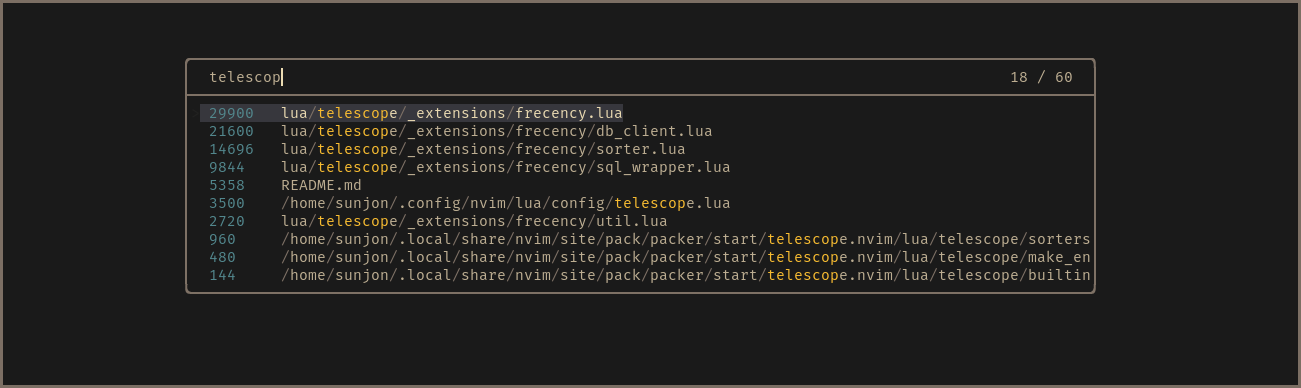
- Scores shown in finder for demonstration purposes - disabled by default
Frecency: Sorting by 'frequency' and 'recency'
'Frecency' is a score given to each unique file indexed in a file history database.
A timestamp is recorded once per session when a file is first loaded into a buffer.
The score is calculated using the age of the 10 most recent timestamps and the total amount of times that the file has been loaded:
Recency values (per timestamp)
| Timestamp age | Value |
|---|---|
| 4 hours | 100 |
| 1 day | 80 |
| 3 days | 60 |
| 1 week | 40 |
| 1 month | 20 |
| 90 days | 10 |
Score calculation
score = frequency * recency_score / max_number_of_timestamps
Requirements
- telescope.nvim (required)
- sql.nvim (required)
Timestamps and file records are stored in an SQLite3 database for persistence and speed.
This plugin uses sql.nvim to perform the database transactions.
Installation
Packer.nvim
use {
  "sunjon/telescope-frecency",
  config = function()
    require"telescope".load_extension("frecency")
  end
}
TODO: add installation instructions for other package managers
If no database is found when running Neovim with the plugin installed, a new one is created and entries from shada v:oldfiles are automatically imported.
Usage
:Telescope frecency
..or to map to a key:
vim.api.nvim_set_keymap("n", "<leader><leader>", "<Cmd>lua require('telescope').extensions.frecency.frecency()<CR>", {noremap = true, silent = true})
Configuration
See default configuration for full details on configuring Telescope.
ignore_patterns
This setting controls which files are indexed (and subsequently which you'll see in the finder results).
show_scores
To see the scores generated by the algorithm in the results, set this to true.
If you've not configured the extension, the following values are used:
telescope.setup {
  extensions = {
    frecency = {
      show_scores = false,
      ignore_patterns = {"*.git/*", "*/tmp/*"},
    }
  },
}
Highlight Groups
TelescopePathSeparator
TelescopeBufferLoaded