mirror of
https://github.com/kristoferssolo/solorice.git
synced 2025-10-21 20:10:34 +00:00

100 lines
4.2 KiB
Markdown
100 lines
4.2 KiB
Markdown
# The Eternal Jukebox
|
|
|
|
For when your favorite song just isn't long enough.
|
|
|
|
|
|
|
|
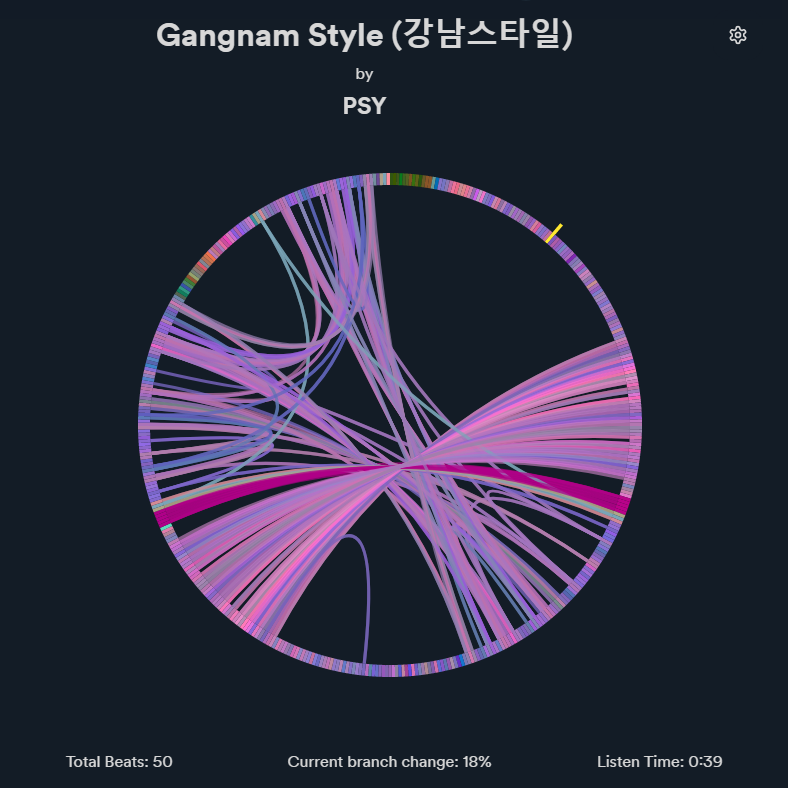
A rewrite of the [Infinite / Eternal Jukebox](https://eternalbox.dev/jukebox_index.html) for Spicetify.
|
|
It finds pathways through similar segments of the song and plays a never-ending and ever changing version of the song.
|
|
|
|
> **Warning**
|
|
> The custom app is still in **beta**.
|
|
> See [known issues](#known-issues) and [upcoming features](#upcoming-features).
|
|
|
|
|
|
## Auto Installation (Linux)
|
|
```
|
|
sh <(curl -s https://raw.githubusercontent.com/Pithaya/spicetify-apps/main/custom-apps/eternal-jukebox/src/install.sh)
|
|
|
|
```
|
|
|
|
## Manual Installation
|
|
|
|
1. Run `spicetify config-dir` to open the spicetify folder.
|
|
2. Go to the `CustomApps` folder.
|
|
3. Create a `eternal-jukebox` folder.
|
|
4. Download the custom app files as a zip from [here](https://github.com/Pithaya/spicetify-apps-dist/archive/refs/heads/dist/eternal-jukebox.zip).
|
|
5. Extract the zip and put the files inside the folder you created in step 3.
|
|
|
|
Then, run the following commands:
|
|
|
|
```sh
|
|
spicetify config custom_apps eternal-jukebox
|
|
spicetify apply
|
|
```
|
|
|
|
## Usage
|
|
|
|
A new "infinity" button allows you to enable and disable the jukebox. As long as the jukebox is enabled, the current song will play endlessly.
|
|
|
|

|
|
|
|
Changing the current song will automatically play it through the jukebox.
|
|
|
|

|
|
|
|
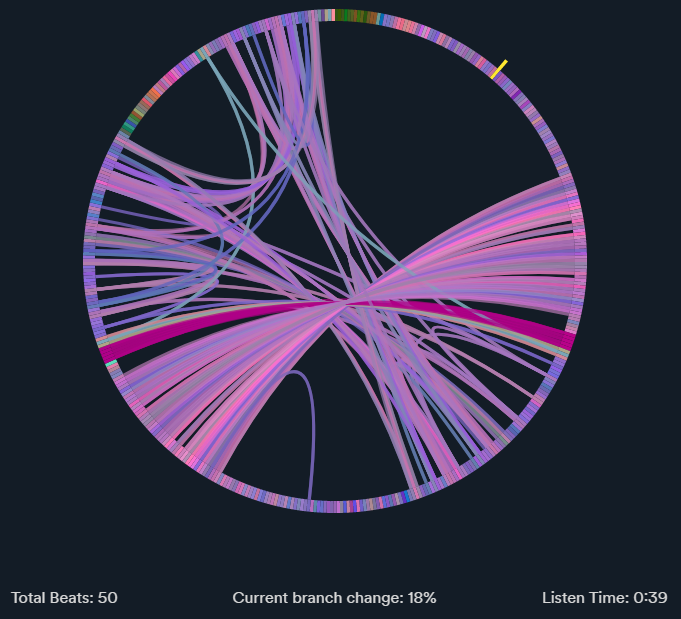
The custom app allows you to see a visualization of the jukebox's progress through the song.
|
|
|
|
|
|
|
|
The circle is made out of the different beats of the song. Branches, or edges are the path linking similar beats together.
|
|
|
|
Holding the `SHIFT` key allows you to keep repeating a part of the song by "jumping" through edges linking the same beats.
|
|
|
|
Clicking on a beat will seek to that part of the song.
|
|
|
|
Below the graph you will find some stats about the current song:
|
|
|
|
- **Total beats**: How many beats were played.
|
|
- **Current branch change**: The current percentage of chance to follow an edge when playing a beat.
|
|
- **Listen time**: How long you've been listening to the song.
|
|
|
|
### Settings
|
|
|
|
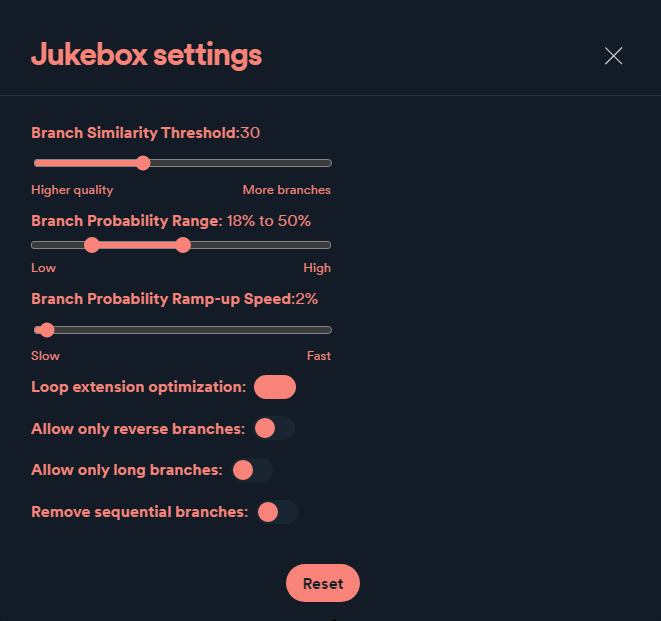
The settings button on the top right allows you to tune the jukebox.
|
|
|
|
|
|
|
|
- **Branch similarity threshold**: The maximum allowed "distance" between two branches. The higher it is, the more branches will be generated.
|
|
- **Branch probability range**: The minimum and maximum percentage of chance to use a branch each beat. The chance will start at the minimum value, and will increase by the **Branch probability ramp-up speed** value for every beat where it is not branching, until it reaches the maximum value.
|
|
- **Branch probability ramp-up speed**: How fast the **Branch probability chance** value should increase.
|
|
- **Loop extension optimization**: If checked, will try to add the longest backward branch it can at the last branching beat.
|
|
- **Allow only reverse branches**: If checked, will only add branches going back in the song.
|
|
- **Allow only long branches**: If checked, will only add long branches. A branch is considered long if it covers at least a fifth of the song's length.
|
|
- **Remove sequential branches**: If checked, will remove consecutive branches of the same length.
|
|
|
|
The reset button can be used to reset the settings to the default values.
|
|
|
|
## Known issues
|
|
|
|
- Audio lag when jumping between parts of the song
|
|
- Jukebox "freezing" and getting out of sync
|
|
- Songs getting stuck in short loops due to issues with the graph generation
|
|
|
|
## Upcoming features
|
|
|
|
- More graph interactivity
|
|
|
|
## Uninstall
|
|
|
|
1. Run `spicetify config-dir` to open the spicetify folder
|
|
2. Go to the `CustomApps` folder
|
|
3. Delete the `eternal-jukebox` folder
|
|
|
|
Then, run the following commands:
|
|
|
|
```sh
|
|
spicetify config custom_apps eternal-jukebox-
|
|
spicetify apply
|
|
```
|