mirror of
https://github.com/kristoferssolo/solorice.git
synced 2025-10-21 20:10:34 +00:00

185 lines
4.9 KiB
Markdown
185 lines
4.9 KiB
Markdown
# Path Intellisense
|
|
|
|
Visual Studio Code plugin that autocompletes filenames.
|
|
|
|
## Sponsors
|
|
|
|
<p><a title="Try CodeStream" href="https://sponsorlink.codestream.com/?utm_source=vscmarket&utm_campaign=pathintel&utm_medium=banner"><img src="https://alt-images.codestream.com/codestream_logo_pathintel.png"></a></br>
|
|
Eliminate context switching and costly distractions. Create and merge PRs and perform code reviews from inside your IDE while using jump-to-definition, your favorite keybindings, and other IDE tools.<br> <a title="Try CodeStream" href="https://sponsorlink.codestream.com/?utm_source=vscmarket&utm_campaign=pathintel&utm_medium=banner">Learn more</a></p>
|
|
|
|
<p>
|
|
<a title="Try stepsize" href="https://bit.ly/36ccDka"><img src="https://github.com/ChristianKohler/PathIntellisense/raw/HEAD/./docs/images/sponsors/stepsize.png"></a></br>
|
|
Track and prioritise tech debt and maintenance issues, straight from your IDE. Bookmark code while you work, organise TODOs and share codebase knowledge with your team. <a title="Try stepsize" href="https://bit.ly/36ccDka">Try it out for free today.</a>
|
|
</p>
|
|
|
|
<p>
|
|
<a title="Try Duckly" href="https://bit.ly/3shNY8x"><img src="https://github.com/ChristianKohler/PathIntellisense/raw/HEAD/./docs/images/sponsors/duckly.png"></a></br>
|
|
Easy pair programming with any IDE. Duckly enables you to talk, share your code in real-time, server and terminal with people using different IDEs. <a title="Try stepsize" href="https://bit.ly/3shNY8x">Try it out for free.</a>
|
|
</p>
|
|
|
|
## Installation
|
|
|
|
In the command palette (cmd-shift-p) select Install Extension and choose Path Intellisense.
|
|
|
|
To use Path Intellisense instead of the default autocompletion, the following configuration option must be added to your settings:
|
|
|
|
```javascript
|
|
{ "typescript.suggest.paths": false }
|
|
{ "javascript.suggest.paths": false }
|
|
```
|
|
|
|
## Usage
|
|
|
|
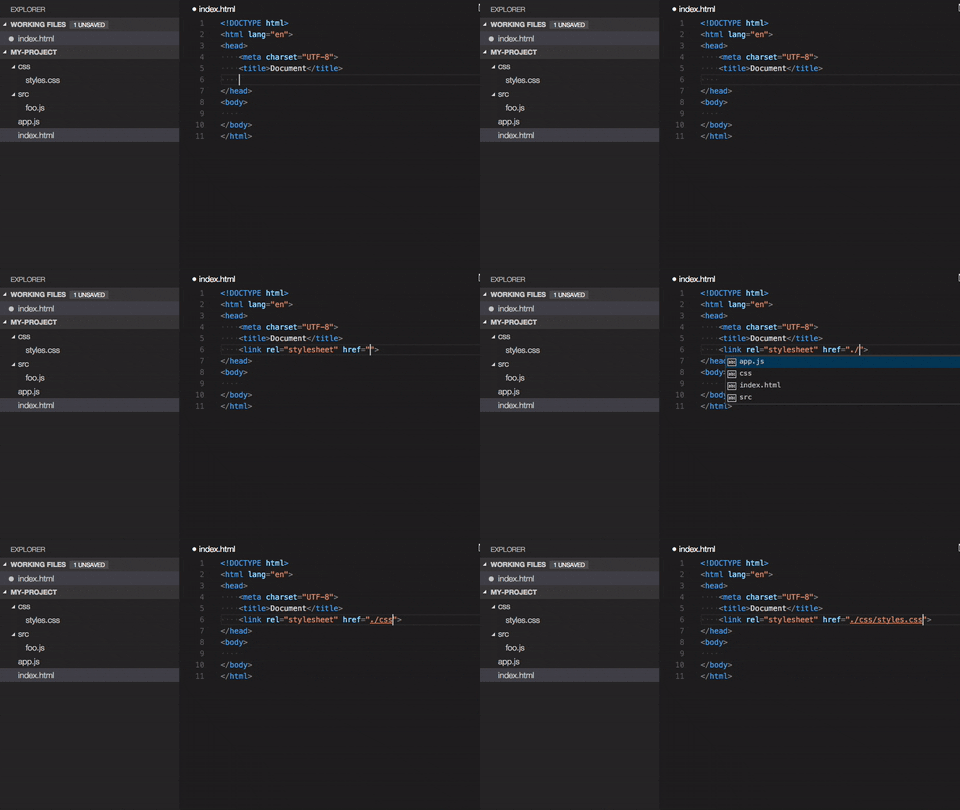
|
|
|
|
## Node packages intellisense
|
|
|
|
Use [npm intellisense](https://marketplace.visualstudio.com/items?itemName=christian-kohler.npm-intellisense)
|
|
|
|
## Contributing
|
|
|
|
Something missing? Found a bug? - Create a pull request or an issue.
|
|
[Github](https://github.com/ChristianKohler/PathIntellisense)
|
|
|
|
[Open in Gitpod](https://gitpod.io/#https://github.com/ChristianKohler/PathIntellisense)
|
|
|
|
## Are you a windows user?
|
|
|
|
There is an issue on windows with the period key. See Issue https://github.com/ChristianKohler/NpmIntellisense/issues/12
|
|
|
|
Add this to the keybinding:
|
|
|
|
```javascript
|
|
{ "key": ".", "command": "" }
|
|
```
|
|
|
|
## TsConfig support
|
|
|
|
### BaseUrl
|
|
|
|
Pathintellisense uses the ts.config.compilerOptions.baseUrl as a mapping. So no need to define it twice. There is no support for paths at the moment.
|
|
|
|
For example:
|
|
|
|
```markdown
|
|
# Folderstructure
|
|
|
|
src/
|
|
module-a
|
|
foo.ts
|
|
module-b
|
|
```
|
|
|
|
```javascript
|
|
// tsconfig
|
|
|
|
{
|
|
"baseUrl": "src",
|
|
}
|
|
```
|
|
|
|
would allow to type:
|
|
|
|
```javascript
|
|
{
|
|
import {} from "module-a/foo.ts";
|
|
}
|
|
```
|
|
|
|
You can disable this behaviour by setting it to true:
|
|
|
|
```javascript
|
|
{
|
|
"path-intellisense.ignoreTsConfigBaseUrl": true,
|
|
}
|
|
```
|
|
|
|
## Settings
|
|
|
|
### File extension in import statements
|
|
|
|
Path Intellisense removes the file extension by default if the statement is a import statement. To enable file extensions set the following setting to true:
|
|
|
|
```javascript
|
|
{
|
|
"path-intellisense.extensionOnImport": true,
|
|
}
|
|
```
|
|
|
|
### Show hidden files
|
|
|
|
Per default, hidden files are not displayed. Set this to true to show hidden files.
|
|
|
|
```javascript
|
|
{
|
|
"path-intellisense.showHiddenFiles": true,
|
|
}
|
|
```
|
|
|
|
If set to false, PathIntellisense ignores the default "files.exclude" as well:
|
|
|
|
```javascript
|
|
{
|
|
"files.exclude": {
|
|
"**/*.map.js": true
|
|
}
|
|
}
|
|
```
|
|
|
|
### Auto slash when navigating to folder
|
|
|
|
Per default, the autocompletion does not add a slash after a directory.
|
|
|
|
```javascript
|
|
{
|
|
"path-intellisense.autoSlashAfterDirectory": false,
|
|
}
|
|
```
|
|
|
|
### Automatically trigger next suggestion
|
|
|
|
When a suggestion was selected, the next suggestion will automatically pop up.
|
|
|
|
This setting will override the `autoSlashAfterDirectory` setting.
|
|
|
|
```javascript
|
|
{
|
|
"path-intellisense.autoTriggerNextSuggestion": false,
|
|
}
|
|
```
|
|
|
|
### Absolute paths
|
|
|
|
Per default, absolute paths are resolved within the current workspace root path.
|
|
Set it to false to resolve absolute paths to the disk root path.
|
|
|
|
```javascript
|
|
{
|
|
"path-intellisense.absolutePathToWorkspace": true,
|
|
}
|
|
```
|
|
|
|
### Mappings
|
|
|
|
Define custom mappings which can be useful for using absolute paths or in combination with webpack resolve options.
|
|
|
|
```javascript
|
|
{
|
|
"path-intellisense.mappings": {
|
|
"/": "${workspaceFolder}",
|
|
"lib": "${workspaceFolder}/lib",
|
|
"global": "/Users/dummy/globalLibs"
|
|
},
|
|
}
|
|
```
|
|
|
|
Use \${workspaceFolder} when the path should be relative to the current root of the current project. V2.2.1 and lower used \${workspaceRoot}. Newer version support both placeholders.
|
|
|
|
## History
|
|
|
|
See changelog
|
|
|
|
## License
|
|
|
|
This software is released under [MIT License](https://www.opensource.org/licenses/mit-license.php)
|