mirror of
https://github.com/kristoferssolo/solorice.git
synced 2025-10-21 20:10:34 +00:00

569 lines
22 KiB
Markdown
569 lines
22 KiB
Markdown
# Spelling Checker for Visual Studio Code
|
|
|
|
A basic spell checker that works well with camelCase code.
|
|
|
|
The goal of this spell checker is to help catch common spelling errors while keeping the number of false positives low.
|
|
|
|
## Support Further Development
|
|
|
|
- Become a [ Patreon!](https://patreon.com/streetsidesoftware)
|
|
|
|
- [Support through ](https://www.paypal.com/donate/?hosted_button_id=26LNBP2Q6MKCY)
|
|
- [Open Collective](https://opencollective.com/code-spell-checker)
|
|
|
|
## Sponsors
|
|
|
|
[](https://sponsorlink.codestream.com/?utm_source=vscmarket&utm_campaign=codespellchecker&utm_medium=banner 'Try CodeStream')
|
|
|
|
Manage pull requests and conduct code reviews in your IDE with full source-tree context.
|
|
Comment on any line, not just the diffs. Use jump-to-definition, your favorite keybindings,
|
|
and code intelligence with more of your workflow.<br>
|
|
[Learn More](https://sponsorlink.codestream.com/?utm_source=vscmarket&utm_campaign=codespellchecker&utm_medium=banner 'Try CodeStream')
|
|
|
|
## Functionality
|
|
|
|
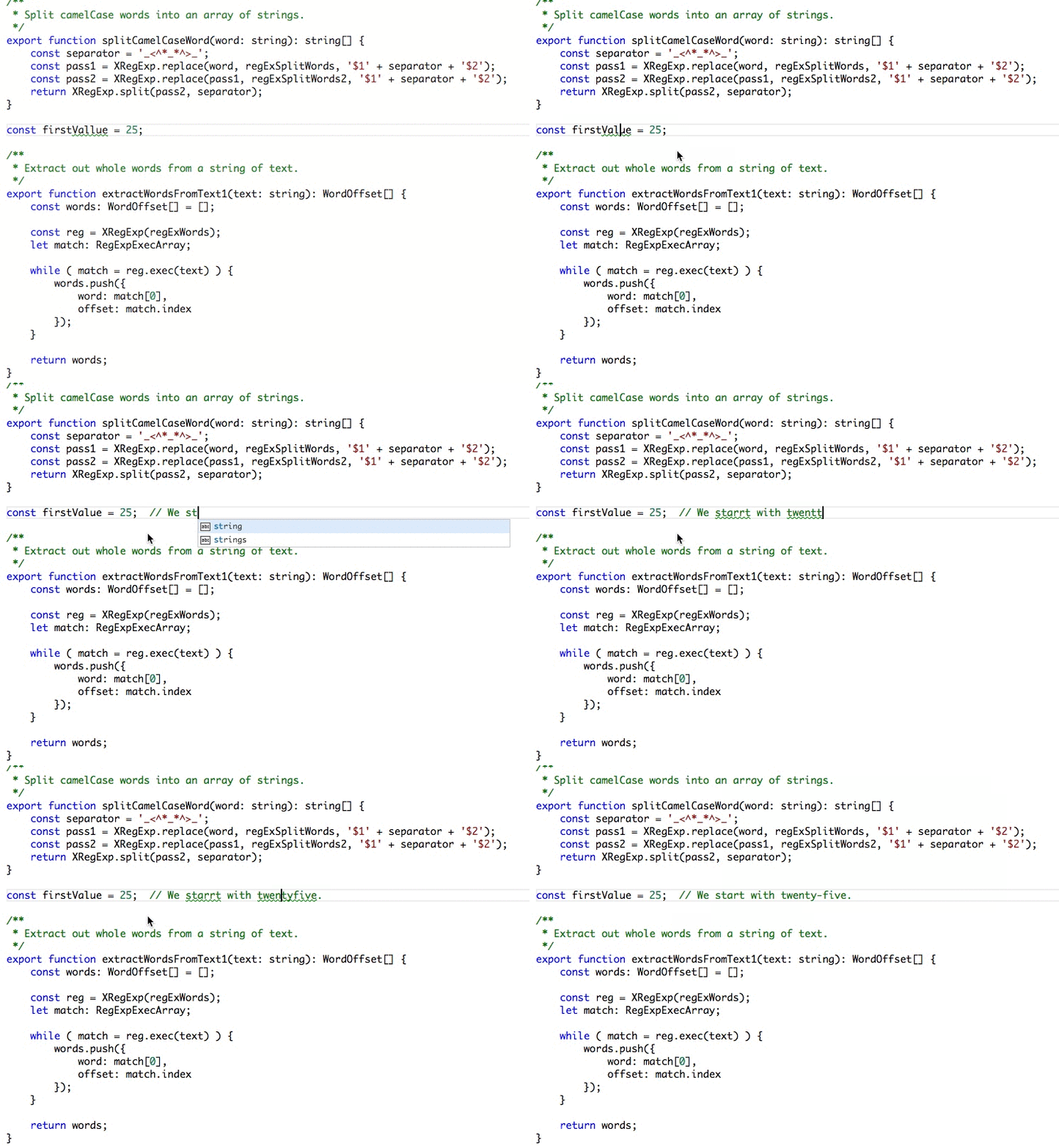
Load a TypeScript, JavaScript, Text, etc. file. Words not in the dictionary files will have
|
|
a squiggly underline.
|
|
|
|
### Example
|
|
|
|
|
|
|
|
## Suggestions
|
|
|
|
|
|
|
|
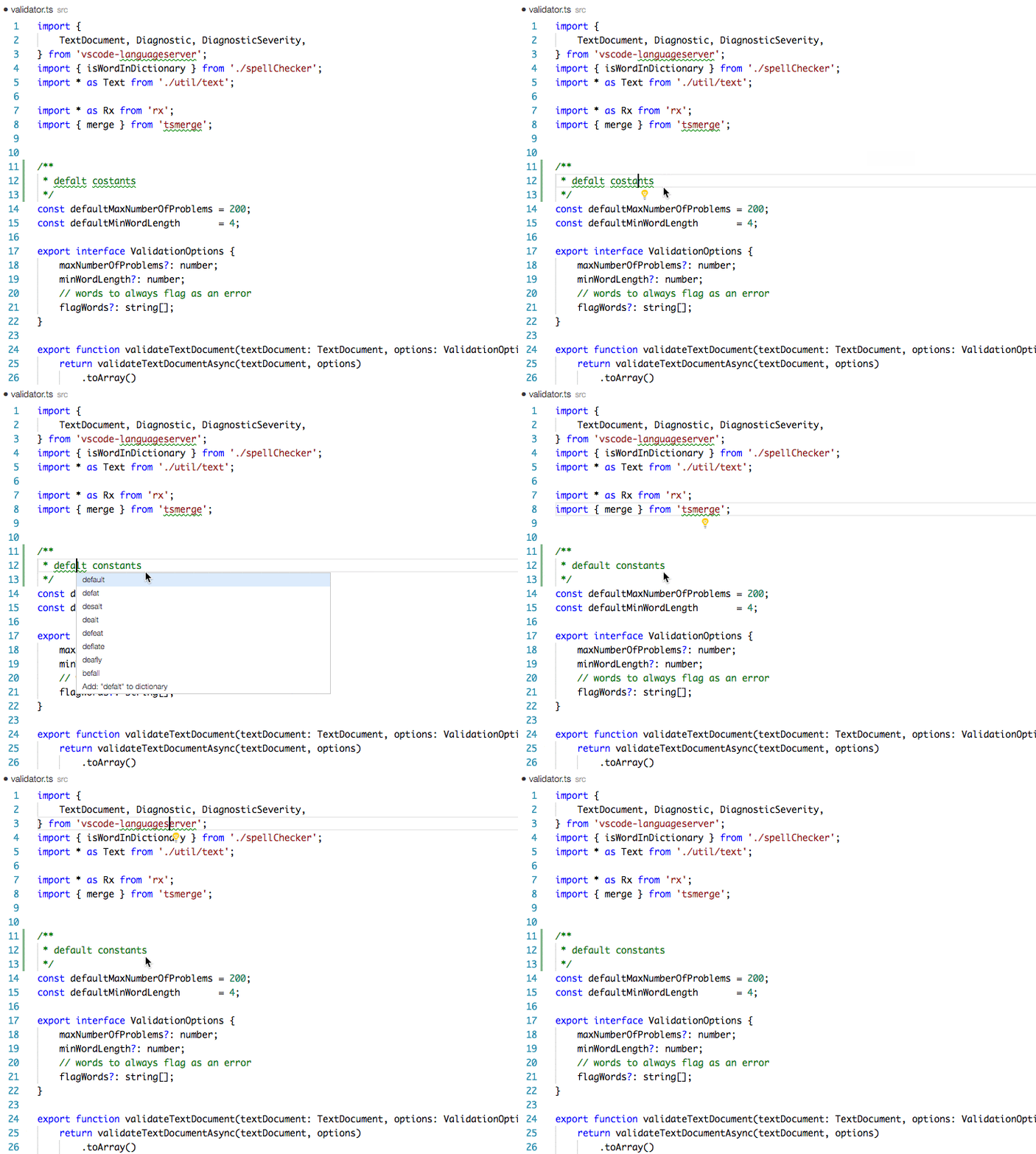
To see the list of suggestions:
|
|
|
|
After positioning the cursor in the word, any of the following should display the list of suggestions:
|
|
|
|
- Click on the 💡 (lightbulb) in the left hand margin.
|
|
- [`Quick Fix`](https://code.visualstudio.com/docs/getstarted/keybindings#_rich-languages-editing) Editor action command:
|
|
- Mac: `⌘`+`.` or `Cmd`+`.`
|
|
- PC: `Ctrl`+`.`
|
|
|
|
## Install
|
|
|
|
Open up VS Code and hit `F1` and type `ext` select install and type `code-spell-checker` hit enter and reload window to enable.
|
|
|
|
## Supported Languages
|
|
|
|
- English (US)
|
|
- English (GB) - turn on by changing `"cSpell.language": "en"` to `"cSpell.language": "en-GB"`
|
|
|
|
## Add-On Language Dictionaries
|
|
|
|
- [Catalan](https://marketplace.visualstudio.com/items?itemName=streetsidesoftware.code-spell-checker-catalan)
|
|
- [Czech](https://marketplace.visualstudio.com/items?itemName=streetsidesoftware.code-spell-checker-czech)
|
|
- [Danish](https://marketplace.visualstudio.com/items?itemName=streetsidesoftware.code-spell-checker-danish)
|
|
- [Dutch](https://marketplace.visualstudio.com/items?itemName=streetsidesoftware.code-spell-checker-dutch)
|
|
- [French](https://marketplace.visualstudio.com/items?itemName=streetsidesoftware.code-spell-checker-french)
|
|
- [French <!-- cSpell:disable -->Réforme<!-- cSpell:enable --> 90](https://marketplace.visualstudio.com/items?itemName=streetsidesoftware.code-spell-checker-french-reforme)
|
|
- [German](https://marketplace.visualstudio.com/items?itemName=streetsidesoftware.code-spell-checker-german)
|
|
- [Greek](https://marketplace.visualstudio.com/items?itemName=streetsidesoftware.code-spell-checker-greek)
|
|
- [Hebrew](https://marketplace.visualstudio.com/items?itemName=streetsidesoftware.code-spell-checker-hebrew)
|
|
- [Italian](https://marketplace.visualstudio.com/items?itemName=streetsidesoftware.code-spell-checker-italian)
|
|
- [Persian](https://marketplace.visualstudio.com/items?itemName=streetsidesoftware.code-spell-checker-persian)
|
|
- [Polish](https://marketplace.visualstudio.com/items?itemName=streetsidesoftware.code-spell-checker-polish)
|
|
- [Portuguese - Brazilian](https://marketplace.visualstudio.com/items?itemName=streetsidesoftware.code-spell-checker-portuguese-brazilian)
|
|
- [Portuguese](https://marketplace.visualstudio.com/items?itemName=streetsidesoftware.code-spell-checker-portuguese)
|
|
- [Russian](https://marketplace.visualstudio.com/items?itemName=streetsidesoftware.code-spell-checker-russian)
|
|
- [Spanish](https://marketplace.visualstudio.com/items?itemName=streetsidesoftware.code-spell-checker-spanish)
|
|
- [Swedish](https://marketplace.visualstudio.com/items?itemName=streetsidesoftware.code-spell-checker-swedish)
|
|
- [Turkish](https://marketplace.visualstudio.com/items?itemName=streetsidesoftware.code-spell-checker-turkish)
|
|
- [Ukrainian](https://marketplace.visualstudio.com/items?itemName=streetsidesoftware.code-spell-checker-ukrainian)
|
|
|
|
## Add-On Specialized Dictionaries
|
|
|
|
- [Medical Terms](https://marketplace.visualstudio.com/items?itemName=streetsidesoftware.code-spell-checker-medical-terms)
|
|
|
|
## Enabled File Types
|
|
|
|
- AsciiDoc
|
|
- C, C++
|
|
- C#
|
|
- css, less, scss
|
|
- Dart
|
|
- Elixir
|
|
- Go
|
|
- Html
|
|
- Java
|
|
- JavaScript
|
|
- JSON / JSONC
|
|
- LaTeX
|
|
- Markdown
|
|
- PHP
|
|
- PowerShell
|
|
- Pug / Jade
|
|
- Python
|
|
- reStructuredText
|
|
- Rust
|
|
- Scala
|
|
- Text
|
|
- TypeScript
|
|
- YAML
|
|
|
|
### Enable / Disable File Types
|
|
|
|
To _Enable_ or _Disable_ spell checking for a file type:
|
|
|
|
1. Click on the Spell Checker status in the status bar:
|
|
|
|
<img src="https://raw.githubusercontent.com/streetsidesoftware/vscode-spell-checker/main/images/StatusBarJsonDisabled.png" alt="Spell Checker Status Bar" width=200>
|
|
|
|
2. On the Info screen, click the **_Enable_** link.
|
|
|
|
<img src="https://raw.githubusercontent.com/streetsidesoftware/vscode-spell-checker/main/images/CSpellInfoJsonDisabled.png" alt="Spell Checker Information Window" width=500>
|
|
|
|
## How it works with camelCase
|
|
|
|
The concept is simple, split camelCase words before checking them against a list of known English words.
|
|
|
|
- camelCase -> camel case
|
|
- HTMLInput -> html input -- Notice that the `I` is associated with `Input` and not `HTML`
|
|
- snake_case_words -> snake case words
|
|
- camel2snake -> camel snake -- (the 2 is ignored)
|
|
|
|
### Special case with ALL CAPS words
|
|
|
|
There are a few special cases to help with common spelling practices for ALL CAPS words.
|
|
|
|
Trailing `s`, `ing`, `ies`, `es`, `ed` are kept with the previous word.
|
|
|
|
- CURLs -> curls -- trailing `s`
|
|
- CURLedRequest -> curled request -- trailing `ed`
|
|
|
|
## Things to note
|
|
|
|
- This spellchecker is case insensitive. It will not catch errors like english which should be English.
|
|
- The spellchecker uses a local word dictionary. It does not send anything outside your machine.
|
|
- The words in the dictionary can and do contain errors.
|
|
- There are missing words.
|
|
- Only words longer than 3 characters are checked. "jsj" is ok, while "jsja" is not.
|
|
- All symbols and punctuation are ignored.
|
|
|
|
## In Document Settings
|
|
|
|
It is possible to add spell check settings into your source code.
|
|
This is to help with file specific issues that may not be applicable to the entire project.
|
|
|
|
All settings are prefixed with `cSpell:` or `spell-checker:`.
|
|
|
|
- `disable` -- turn off the spell checker for a section of code.
|
|
- `enable` -- turn the spell checker back on after it has been turned off.
|
|
- `ignore` -- specify a list of words to be ignored.
|
|
- `words` -- specify a list of words to be considered correct and will appear in the suggestions list.
|
|
- `ignoreRegExp` -- Any text matching the regular expression will NOT be checked for spelling.
|
|
- `includeRegExp` -- Only text matching the collection of includeRegExp will be checked.
|
|
- `enableCompoundWords` / `disableCompoundWords` -- Allow / disallow words like: "stringlength".
|
|
|
|
### Enable / Disable checking sections of code
|
|
|
|
It is possible to disable / enable the spell checker by adding comments to your code.
|
|
|
|
#### Disable Checking
|
|
|
|
- `/* cSpell:disable */`
|
|
- `/* spell-checker: disable */`
|
|
- `/* spellchecker: disable */`
|
|
- `/* cspell: disable-line */`
|
|
- `/* cspell: disable-next-line */`
|
|
<!--- cSpell:enable -->
|
|
|
|
#### Enable Checking
|
|
|
|
- `/* cSpell:enable */`
|
|
- `/* spell-checker: enable */`
|
|
- `/* spellchecker: enable */`
|
|
|
|
#### Example
|
|
|
|
```javascript
|
|
// cSpell:disable
|
|
const wackyWord = ['zaallano', 'wooorrdd', 'zzooommmmmmmm'];
|
|
/* cSpell:enable */
|
|
|
|
// Nest disable / enable is not Supported
|
|
|
|
// spell-checker:disable
|
|
// It is now disabled.
|
|
|
|
var liep = 1;
|
|
|
|
/* cspell:disable */
|
|
// It is still disabled
|
|
|
|
// cSpell:enable
|
|
// It is now enabled
|
|
|
|
const str = 'goededag'; // <- will be flagged as an error.
|
|
|
|
// spell-checker:enable <- doesn't do anything
|
|
|
|
// cSPELL:DISABLE <-- also works.
|
|
|
|
// if there isn't an enable, spelling is disabled till the end of the file.
|
|
const str = 'goedemorgen'; // <- will NOT be flagged as an error.
|
|
```
|
|
|
|
<!--- cSpell:enable -->
|
|
|
|
### Ignore
|
|
|
|
Ignore allows you the specify a list of words you want to ignore within the document.
|
|
|
|
```javascript
|
|
// cSpell:ignore zaallano, wooorrdd
|
|
// cSpell:ignore zzooommmmmmmm
|
|
const wackyWord = ['zaallano', 'wooorrdd', 'zzooommmmmmmm'];
|
|
```
|
|
|
|
**Note:** words defined with `ignore` will be ignored for the entire file.
|
|
|
|
### Words
|
|
|
|
The words list allows you to add words that will be considered correct and will be used as suggestions.
|
|
|
|
```javascript
|
|
// cSpell:words woorxs sweeetbeat
|
|
const companyName = 'woorxs sweeetbeat';
|
|
```
|
|
|
|
**Note:** words defined with `words` will be used for the entire file.
|
|
|
|
### Enable / Disable compound words
|
|
|
|
In some programing language it is common to glue words together.
|
|
|
|
```c
|
|
// cSpell:enableCompoundWords
|
|
char * errormessage; // Is ok with cSpell:enableCompoundWords
|
|
int errornumber; // Is also ok.
|
|
```
|
|
|
|
**Note:** Compound word checking cannot be turned on / off in the same file.
|
|
The last setting in the file determines the value for the entire file.
|
|
|
|
### Excluding and Including Text to be checked.
|
|
|
|
By default, the entire document is checked for spelling.
|
|
`cSpell:disable`/`cSpell:enable` above allows you to block off sections of the document.
|
|
`ignoreRegExp` and `includeRegExp` give you the ability to ignore or include patterns of text.
|
|
By default the flags `gim` are added if no flags are given.
|
|
|
|
The spell checker works in the following way:
|
|
|
|
1. Find all text matching `includeRegExp`
|
|
2. Remove any text matching `excludeRegExp`
|
|
3. Check the remaining text.
|
|
|
|
#### Exclude Example
|
|
|
|
```javascript
|
|
// cSpell:ignoreRegExp 0x[0-9a-f]+ -- will ignore c style hex numbers
|
|
// cSpell:ignoreRegExp /0x[0-9A-F]+/g -- will ignore upper case c style hex numbers.
|
|
// cSpell:ignoreRegExp g{5} h{5} -- will only match ggggg, but not hhhhh or 'ggggg hhhhh'
|
|
// cSpell:ignoreRegExp g{5}|h{5} -- will match both ggggg and hhhhh
|
|
// cSpell:ignoreRegExp /g{5} h{5}/ -- will match 'ggggg hhhhh'
|
|
/* cSpell:ignoreRegExp /n{5}/ -- will NOT work as expected because of the ending comment -> */
|
|
/*
|
|
cSpell:ignoreRegExp /q{5}/ -- will match qqqqq just fine but NOT QQQQQ
|
|
*/
|
|
// cSpell:ignoreRegExp /[^\s]{40,}/ -- will ignore long strings with no spaces.
|
|
// cSpell:ignoreRegExp Email -- this will ignore email like patterns -- see Predefined RegExp expressions
|
|
var encodedImage = 'HR+cPzr7XGAOJNurPL0G8I2kU0UhKcqFssoKvFTR7z0T3VJfK37vS025uKroHfJ9nA6WWbHZ/ASn...';
|
|
var email1 = 'emailaddress@myfancynewcompany.com';
|
|
var email2 = '<emailaddress@myfancynewcompany.com>';
|
|
```
|
|
|
|
**Note:** ignoreRegExp and includeRegExp are applied to the entire file. They do not start and stop.
|
|
|
|
#### Include Example
|
|
|
|
In general you should not need to use `includeRegExp`. But if you are mixing languages then it could come in helpful.
|
|
|
|
```Python
|
|
# cSpell:includeRegExp #.*
|
|
# cSpell:includeRegExp /(["]{3}|[']{3})[^\1]*?\1/g
|
|
# only comments and block strings will be checked for spelling.
|
|
def sum_it(self, seq):
|
|
"""This is checked for spelling"""
|
|
variabele = 0
|
|
alinea = 'this is not checked'
|
|
for num in seq:
|
|
# The local state of 'value' will be retained between iterations
|
|
variabele += num
|
|
yield variabele
|
|
```
|
|
|
|
## Predefined RegExp expressions
|
|
|
|
### Exclude patterns
|
|
|
|
- `Urls`<sup>1</sup> -- Matches urls
|
|
- `HexValues` -- Matches common hex format like #aaa, 0xfeef, \\u0134
|
|
- `EscapeCharacters`<sup>1</sup> -- matches special characters: '\\n', '\\t' etc.
|
|
- `Base64`<sup>1</sup> -- matches base64 blocks of text longer than 40 characters.
|
|
- `Email` -- matches most email addresses.
|
|
|
|
### Include Patterns
|
|
|
|
- `Everything`<sup>1</sup> -- By default we match an entire document and remove the excludes.
|
|
- `string` -- This matches common string formats like '...', "...", and \`...\`
|
|
- `CStyleComment` -- These are C Style comments /\* \*/ and //
|
|
- `PhpHereDoc` -- This matches PHPHereDoc strings.
|
|
|
|
<sup>1.</sup> These patterns are part of the default include/exclude list for every file.
|
|
|
|
## Customization
|
|
|
|
The spell checker configuration can be controlled via VS Code preferences or `cspell.json` configuration file.
|
|
|
|
Order of precedence:
|
|
|
|
1. Workspace Folder `cspell.json`
|
|
1. Workspace Folder `.vscode/cspell.json`
|
|
1. VS Code Preferences `cSpell` section.
|
|
|
|
### Adding words to the Workspace Dictionary
|
|
|
|
You have the option to add you own words to the workspace dictionary. The easiest, is to put your cursor
|
|
on the word you wish to add, when you lightbulb shows up, hit `Ctrl+.` (windows) / `Cmd+.` (Mac). You will get a list
|
|
of suggestions and the option to add the word.
|
|
|
|
You can also type in a word you want to add to the dictionary: `F1` `add word` -- select `Add Word to Dictionary` and type in the word you wish to add.
|
|
|
|
### cspell.json
|
|
|
|
Words added to the dictionary are placed in the `cspell.json` file in the _workspace_ folder.
|
|
Note, the settings in `cspell.json` will override the equivalent cSpell settings in VS Code's `settings.json`.
|
|
|
|
#### Example _cspell.json_ file
|
|
|
|
```javascript
|
|
// cSpell Settings
|
|
{
|
|
// Version of the setting file. Always 0.2
|
|
"version": "0.2",
|
|
// language - current active spelling language
|
|
"language": "en",
|
|
// words - list of words to be always considered correct
|
|
"words": [
|
|
"mkdirp",
|
|
"tsmerge",
|
|
"githubusercontent",
|
|
"streetsidesoftware",
|
|
"vsmarketplacebadge",
|
|
"visualstudio"
|
|
],
|
|
// flagWords - list of words to be always considered incorrect
|
|
// This is useful for offensive words and common spelling errors.
|
|
// For example "hte" should be "the"
|
|
"flagWords": [
|
|
"hte"
|
|
]
|
|
}
|
|
```
|
|
|
|
### VS Code Configuration Settings
|
|
|
|
```javascript
|
|
//-------- Code Spell Checker Configuration --------
|
|
// The Language local to use when spell checking. "en", "en-US" and "en-GB" are currently supported by default.
|
|
"cSpell.language": "en",
|
|
|
|
// Controls the maximum number of spelling errors per document.
|
|
"cSpell.maxNumberOfProblems": 100,
|
|
|
|
// Controls the number of suggestions shown.
|
|
"cSpell.numSuggestions": 8,
|
|
|
|
// The minimum length of a word before checking it against a dictionary.
|
|
"cSpell.minWordLength": 4,
|
|
|
|
// Specify file types to spell check.
|
|
"cSpell.enabledLanguageIds": [
|
|
"csharp",
|
|
"go",
|
|
"javascript",
|
|
"javascriptreact",
|
|
"markdown",
|
|
"php",
|
|
"plaintext",
|
|
"typescript",
|
|
"typescriptreact",
|
|
"yml"
|
|
],
|
|
|
|
// Enable / Disable the spell checker.
|
|
"cSpell.enabled": true,
|
|
|
|
// Display the spell checker status on the status bar.
|
|
"cSpell.showStatus": true,
|
|
|
|
// Words to add to dictionary for a workspace.
|
|
"cSpell.words": [],
|
|
|
|
// Enable / Disable compound words like 'errormessage'
|
|
"cSpell.allowCompoundWords": false,
|
|
|
|
// Words to be ignored and not suggested.
|
|
"cSpell.ignoreWords": ["behaviour"],
|
|
|
|
// User words to add to dictionary. Should only be in the user settings.
|
|
"cSpell.userWords": [],
|
|
|
|
// Specify paths/files to ignore.
|
|
"cSpell.ignorePaths": [
|
|
"node_modules", // this will ignore anything the node_modules directory
|
|
"**/node_modules", // the same for this one
|
|
"**/node_modules/**", // the same for this one
|
|
"node_modules/**", // Doesn't currently work due to how the current working directory is determined.
|
|
"vscode-extension", //
|
|
".git", // Ignore the .git directory
|
|
"*.dll", // Ignore all .dll files.
|
|
"**/*.dll" // Ignore all .dll files
|
|
],
|
|
|
|
// flagWords - list of words to be always considered incorrect
|
|
// This is useful for offensive words and common spelling errors.
|
|
// For example "hte" should be "the"`
|
|
"cSpell.flagWords": ["hte"],
|
|
|
|
// Set the delay before spell checking the document. Default is 50.
|
|
"cSpell.spellCheckDelayMs": 50,
|
|
```
|
|
|
|
## Dictionaries
|
|
|
|
The spell checker includes a set of default dictionaries.
|
|
|
|
### General Dictionaries
|
|
|
|
- **wordsEn** - Derived from Hunspell US English words.
|
|
- **wordsEnGb** - Derived from Hunspell GB English words.
|
|
- **companies** - List of well known companies
|
|
- **softwareTerms** - Software Terms and concepts like "coroutine", "debounce", "tree", etc.
|
|
- **misc** - Terms that do not belong in the other dictionaries.
|
|
|
|
### Programming Language Dictionaries
|
|
|
|
- **typescript** - keywords for Typescript and Javascript
|
|
- **node** - terms related to using nodejs.
|
|
- **php** - _php_ keywords and library methods
|
|
- **go** - _go_ keywords and library methods
|
|
- **python** - _python_ keywords
|
|
- **powershell** - _powershell_ keywords
|
|
- **html** - _html_ related keywords
|
|
- **css** - _css_, _less_, and _scss_ related keywords
|
|
|
|
### Miscellaneous Dictionaries
|
|
|
|
- **fonts** - long list of fonts - to assist with _css_
|
|
|
|
Based upon the programming language, different dictionaries will be loaded.
|
|
|
|
Here are the default rules: "\*" matches any language.
|
|
`"local"` is used to filter based upon the `"cSpell.language"` setting.
|
|
|
|
```javascript
|
|
{
|
|
"cSpell.languageSettings": [
|
|
{ "languageId": '*', "local": 'en', "dictionaries": ['wordsEn'] },
|
|
{ "languageId": '*', "local": 'en-US', "dictionaries": ['wordsEn'] },
|
|
{ "languageId": '*', "local": 'en-GB', "dictionaries": ['wordsEnGb'] },
|
|
{ "languageId": '*', "dictionaries": ['companies', 'softwareTerms', 'misc'] },
|
|
{ "languageId": "python", "allowCompoundWords": true, "dictionaries": ["python"]},
|
|
{ "languageId": "go", "allowCompoundWords": true, "dictionaries": ["go"] },
|
|
{ "languageId": "javascript", "dictionaries": ["typescript", "node"] },
|
|
{ "languageId": "javascriptreact", "dictionaries": ["typescript", "node"] },
|
|
{ "languageId": "typescript", "dictionaries": ["typescript", "node"] },
|
|
{ "languageId": "typescriptreact", "dictionaries": ["typescript", "node"] },
|
|
{ "languageId": "html", "dictionaries": ["html", "fonts", "typescript", "css"] },
|
|
{ "languageId": "php", "dictionaries": ["php", "html", "fonts", "css", "typescript"] },
|
|
{ "languageId": "css", "dictionaries": ["fonts", "css"] },
|
|
{ "languageId": "less", "dictionaries": ["fonts", "css"] },
|
|
{ "languageId": "scss", "dictionaries": ["fonts", "css"] },
|
|
];
|
|
}
|
|
```
|
|
|
|
### How to add your own Dictionaries
|
|
|
|
#### Global Dictionary
|
|
|
|
To add a global dictionary, you will need change your user settings.
|
|
|
|
##### Define the Dictionary
|
|
|
|
In your user settings, you will need to tell the spell checker where to find your word list.
|
|
|
|
Example adding medical terms, so words like _acanthopterygious_ can be found.
|
|
|
|
```javascript
|
|
// A List of Dictionary Definitions.
|
|
"cSpell.dictionaryDefinitions": [
|
|
{ "name": "medicalTerms", "path": "/Users/guest/projects/cSpell-WordLists/dictionaries/medicalterms-en.txt"},
|
|
// To specify a path relative to the workspace folder use ${workspaceFolder} or ${workspaceFolder:Name}
|
|
{ "name": "companyTerms", "path": "${workspaceFolder}/../company/terms.txt"}
|
|
],
|
|
// List of dictionaries to use when checking files.
|
|
"cSpell.dictionaries": [
|
|
"medicalTerms",
|
|
"companyTerms"
|
|
]
|
|
```
|
|
|
|
**Explained:** In this example, we have told the spell checker where to find the word list file.
|
|
Since it is in the user settings, we have to use absolute paths.
|
|
|
|
Once the dictionary is defined. We need to tell the spell checker when to use it.
|
|
Adding it to `cSpell.dictionaries` advises the spell checker to always include the medical terms when spell checking.
|
|
|
|
**Note:** Adding large dictionary files to be always used will slow down the generation of suggestions.
|
|
|
|
#### Project / Workspace Dictionary
|
|
|
|
To add a dictionary at the project level, it needs to be in the `cspell.json` file.
|
|
This file can be either at the project root or in the .vscode directory.
|
|
|
|
Example adding medical terms, where the terms are checked into the project and we only want to use it for .md files.
|
|
|
|
```javascript
|
|
{
|
|
"dictionaryDefinitions": [
|
|
{ "name": "medicalTerms", "path": "./dictionaries/medicalterms-en.txt"},
|
|
{ "name": "cities", "path": "./dictionaries/cities.txt"}
|
|
],
|
|
"dictionaries": [
|
|
"cities"
|
|
],
|
|
"languageSettings": [
|
|
{ "languageId": "markdown", "dictionaries": ["medicalTerms"] },
|
|
{ "languageId": "plaintext", "dictionaries": ["medicalTerms"] }
|
|
]
|
|
}
|
|
```
|
|
|
|
**Explained:** In this example, two dictionaries were defined: _cities_ and _medicalTerms_.
|
|
The paths are relative to the location of the _cSpell.json_ file. This allows for dictionaries to be checked into the project.
|
|
|
|
The _cities_ dictionary is used for every file type, because it was added to the list to _dictionaries_.
|
|
The _medicalTerms_ dictionary is only used when editing _markdown_ or _plaintext_ files.
|
|
|
|
## FAQ
|
|
|
|
See: [FAQ](https://github.com/streetsidesoftware/vscode-spell-checker/blob/main/packages/client/FAQ.md)
|
|
|
|
<!---
|
|
These are at the bottom because the VSCode Marketplace leaves a bit space at the top
|
|
|
|
cSpell:ignore jsja goededag alek wheerd behaviour tsmerge QQQQQ
|
|
cSpell:disableCompoundWords
|
|
cSpell:includeRegExp Everything
|
|
cSpell:ignore hte variabele alinea
|
|
cSpell:ignore mkdirp githubusercontent streetsidesoftware vsmarketplacebadge visualstudio lightbulb stringlength
|
|
cSpell:ignore errormessage errornumber medicalterms acanthopterygious
|
|
cSpell:words Verdana
|
|
-->
|