mirror of
https://github.com/kristoferssolo/solorice.git
synced 2025-10-21 20:10:34 +00:00

253 lines
12 KiB
Markdown
253 lines
12 KiB
Markdown
# Magic Python [](https://travis-ci.org/MagicStack/MagicPython) [](https://atom.io/packages/magicpython) [](https://packagecontrol.io/packages/MagicPython) [](https://marketplace.visualstudio.com/items?itemName=magicstack.MagicPython)
|
|
|
|
This is a package with preferences and syntax highlighter for cutting edge
|
|
Python 3, although Python 2 is well supported, too. The syntax is compatible
|
|
with [Sublime Text](http://www.sublimetext.com), [Atom](http://atom.io) and
|
|
[Visual Studio Code](http://code.visualstudio.com). It is meant to be a drop-in
|
|
replacement for the default Python package.
|
|
|
|
We are proud to say that MagicPython is used by GitHub to highlight Python.
|
|
|
|
**Attention VSCode users**: MagicPython is used as the _default_
|
|
Python highlighter in Visual Studio Code. Don't install it unless you
|
|
want or need the cutting edge version of it. You will likely see no
|
|
difference because you're already using MagicPython.
|
|
|
|
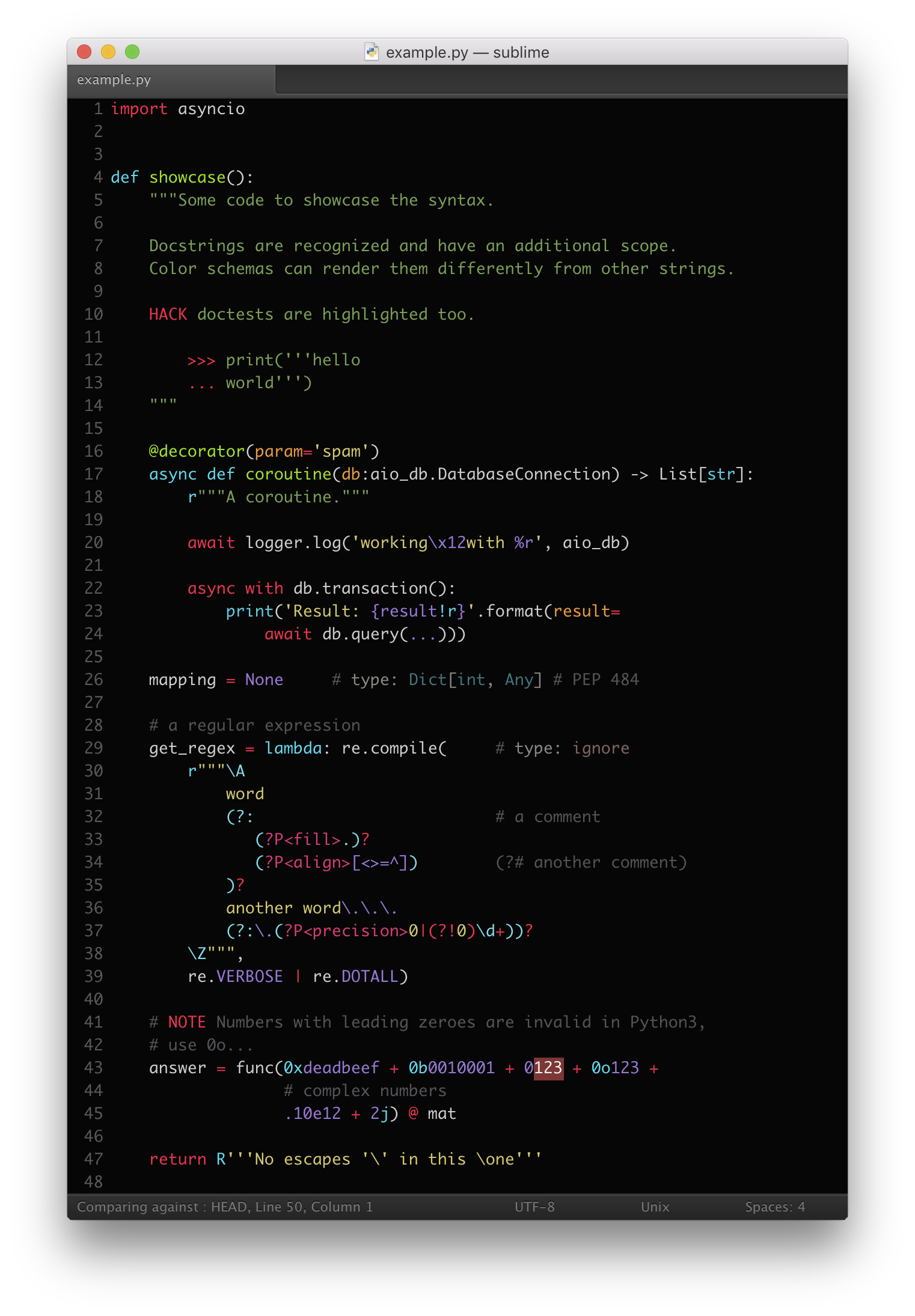
MagicPython correctly highlights all Python 3 syntax features,
|
|
including type annotations, f-strings and regular expressions. It is
|
|
built from scratch for robustness with an extensive test suite.
|
|
|
|
Type hints in comments require support by the color scheme. The one
|
|
used in the screenshot is
|
|
[Chromodynamics](https://github.com/MagicStack/Chromodynamics).
|
|
|
|
|
|
|
|
|
|
## Installation Instructions
|
|
|
|
This is meant to be a drop-in replacement for the default Python package.
|
|
|
|
In **Atom**, install the `MagicPython` package and disable the built-in
|
|
`language-python` package.
|
|
|
|
In **Sublime Text**, install `MagicPython` package via "Package Control" and
|
|
disable the built-in `Python` package (using
|
|
`Package Control -> Disable Package`, or directly by adding `"Python"` to
|
|
`"ignored_packages"` in the settings file).
|
|
|
|
In **VSCode**, starting with version 0.10.1, install `MagicPython` with
|
|
`Install Extension` command.
|
|
|
|
Alternatively, the package can be installed manually in all editors:
|
|
|
|
* copy the MagicPython package into the Sublime/Atom/VSCode user packages
|
|
directory;
|
|
* disable Python package;
|
|
* enjoy.
|
|
|
|
|
|
## Changes and Improvements
|
|
|
|
The main motivation behind this package was the difficulty of using modern
|
|
Python with other common syntax highlighters. They do a good job of the 90% of
|
|
the language, but then fail on the nuances of some very useful, but often
|
|
overlooked features. Function annotations tend to freak out the highlighters in
|
|
various ways. Newly introduced keywords and magic methods are slow to be
|
|
integrated. Another issue is string highlighting, where all raw strings are
|
|
often assumed to be regular expressions or special markup used by `.format` is
|
|
completely ignored. Bumping into all of these issues on daily basis eventually
|
|
led to the creation of this package.
|
|
|
|
Overall, the central idea is that it should be easy to notice something odd or
|
|
special about the code. Odd or special doesn't necessarily mean incorrect, but
|
|
certainly worth the explicit attention.
|
|
|
|
|
|
### Annotations
|
|
|
|
Annotations should not break the highlighting. They should be no more difficult
|
|
to read at a glance than other code or comments.
|
|
|
|
A typical case is having a string annotation that spans several lines by using
|
|
implicit string concatenation. Multi-line strings are suboptimal for use in
|
|
annotations as it may be highly undesirable to have odd indentation and extra
|
|
whitespace in the annotation string. Of course, there is no problem using line
|
|
continuation or even having comments mixed in with implicit string
|
|
concatenation. All of these will be highlighted as you'd expect in any other
|
|
place in the code.
|
|
|
|
```python
|
|
def some_func(a, # nothing fancy here, yet
|
|
|
|
b: 'Annotation: ' # implicitly
|
|
'"foo" for Foo, ' # concatenated
|
|
'"bar" for Bar, ' # annotation
|
|
'"other" otherwise'='otherwise'):
|
|
```
|
|
|
|
A more advanced use case for annotations is to actually have complex expressions
|
|
in them, such as lambda functions, tuples, lists, dicts, sets, comprehensions.
|
|
Admittedly, all of these might be less frequently used, but when they are, you
|
|
can rely on them being highlighted normally in all their glorious details.
|
|
|
|
```python
|
|
# no reason why this should cause the highlighter to break
|
|
#
|
|
def some_func(a:
|
|
# annotation starts here
|
|
lambda x=None:
|
|
{key: val
|
|
for key, val in
|
|
(x if x is not None else [])
|
|
}
|
|
# annotation ends here and below is the default for 'a'
|
|
=42):
|
|
```
|
|
|
|
Result annotations are handled as any other expression would be. No reason to
|
|
worry that the body of the function would look messed up.
|
|
|
|
```python
|
|
# no reason why this should cause the highlighter to break
|
|
#
|
|
def some_func() -> {
|
|
'Some', # comments
|
|
'valid', # are
|
|
'expression' # good
|
|
}:
|
|
```
|
|
|
|
|
|
### Strings
|
|
|
|
Strings are used in many different ways for processing and presenting data.
|
|
Making the highlighter more friendly towards these uses can help you concentrate
|
|
your efforts on what matters rather than visual parsing.
|
|
|
|
Raw strings are often interpreted as regular expressions. This is a bit of a
|
|
problem, because depending on the application this may actually not be the most
|
|
common case. Raw strings can simply be the input to some other processor, in
|
|
which case regexp-specific highlighting is really hindering the overall
|
|
readability. MagicPython follows a convention that a lower-case `r` prefix means
|
|
a regexp string, but an upper-case `R` prefix means just a raw string with no
|
|
special regexp semantics. This convention holds true for all of the legal
|
|
combinations of prefixes. As always the syntax is biased towards Python 3, thus
|
|
it will mark Python-2-only prefixes (i.e. variations of `ur`) as deprecated.
|
|
|
|
String formatting is often only supported for '%-style formatting', however, the
|
|
recommended and more readable syntax used by `.format` is ignored. The benefits
|
|
of using simple and readable `{key}` replacement fields are hindered by the fact
|
|
that in a complex or long string expression it may not be easily apparent what
|
|
parameters will actually be needed by `.format`. This is why MagicPython
|
|
highlights both kinds of string formatting syntax within the appropriate string
|
|
types (bytes don't have a `.format` method in Python 3, so they don't get the
|
|
special highlighting for it, raw and unicode strings do). Additionally, the
|
|
highlighter also validates that the formatting is following the correct syntax.
|
|
It can help noticing an error in complex formatting expressions early.
|
|
|
|
Python 3.6 f-strings are supported in both the raw and regular
|
|
flavors. The support for them is somewhat more powerful than what can
|
|
be done in regular strings with `.format`, because the f-string spec
|
|
allows to highlight them with less ambiguity.
|
|
|
|
|
|
### Numeric literals
|
|
|
|
Most numbers are just regular decimal constants, but any time that octal,
|
|
binary, hexadecimal or complex numbers are used it's worth noting that they are
|
|
of a special type. Highlighting of Python 2 'L' integers is also supported.
|
|
|
|
Underscores in numeric literals are also supported (PEP 515, introduced in
|
|
Python 3.6):
|
|
|
|
```python
|
|
100_000_000_000 0b_1110_0101 0x_FF_12_A0_99
|
|
```
|
|
|
|
|
|
### Python 3.5 features
|
|
|
|
New keywords `async` and `await` are properly highlighted. Currently, these
|
|
keywords are new and are not yet reserved, so the Python interpreter will allow
|
|
using them as variable names. However, `async` and `await` are not recommended
|
|
to be used as variable, class, function or module names. Introduced by
|
|
[PEP 492](https://www.python.org/dev/peps/pep-0492/) in Python 3.5, they will
|
|
become proper keywords in Python 3.7. It is very important that the highlighter
|
|
shows their proper status when they are used as function parameter names, as
|
|
that could otherwise be unnoticed and lead to very messy debugging down the
|
|
road.
|
|
|
|
|
|
### Built-ins and Magic Methods
|
|
|
|
Various built-in types, classes, functions, as well as magic methods are all
|
|
highlighted. Specifically, they are highlighted when they appear as names in
|
|
user definitions. Although it is not an error to have classes and functions that
|
|
mask the built-ins, it is certainly worth drawing attention to, so that masking
|
|
becomes a deliberate rather than accidental act.
|
|
|
|
Highlighting built-ins in class inheritance list makes it slightly more obvious
|
|
where standard classes are extended. It is also easier to notice some typos
|
|
(have you ever typed `Excepiton`?) a little earlier.
|
|
|
|
|
|
### Parameters and Arguments
|
|
|
|
MagicPython highlights keywords when they are used as parameter/argument names.
|
|
This was mentioned for the case of `async` and `await`, but it holds true for
|
|
all other keywords. Although the Python interpreter will produce an appropriate
|
|
error message when reserved keywords are used as identifier names, it's still
|
|
worth showing them early, to spare even this small debugging effort.
|
|
|
|
## Development
|
|
|
|
You need `npm` and `node.js` to work on MagicPython.
|
|
|
|
- clone the repository
|
|
- run `make` to build the local development environment
|
|
- run `make release` to build the syntax packages for Sublime Text and Atom
|
|
(running `make test` also generates the "release" packages)
|
|
|
|
Please note that we have some unit tests for the syntax scoping. We will be
|
|
expanding and updating our test corpus. This allows us to trust that tiny
|
|
inconsistencies will not easily creep in as we update the syntax and fix bugs.
|
|
Use `make test` to run the tests regularly while updating the syntax spec.
|
|
Currently the test files have two parts to them, separated by 3 empty newlines:
|
|
the code to be scoped and the spec that the result must match.
|
|
|
|
If you intend to submit a pull request, please follow the following guidelines:
|
|
|
|
- keep code lines under 80 characters in length, it improves readability
|
|
- please _do_ use multi-line regular expressions for any non-trivial cases like:
|
|
|
|
+ the regexp contains a mix of escaped and unescaped braces/parentheses
|
|
+ the regexp has several `|` in it
|
|
+ the regexp has several pairs of parentheses, especially nested ones
|
|
+ or the regexp is simply longer than 35 characters
|
|
|
|
- always run `make test` to ensure that your changes didn't have unexpected side
|
|
effects
|
|
- update unit tests and add new ones if needed, keeping the test cases short
|
|
whenever possible
|
|
|
|
### Multiple scopes
|
|
|
|
It is sometimes necessary to assign multiple scopes to the same
|
|
matched group. It is *very important* to keep in mind that the order
|
|
of these scopes is apparently treated as significant by the engines
|
|
processing the grammar specs. However, it is equally important to know
|
|
that different specification formats seem to have different order of
|
|
importance (most important first vs. last). Since we try to create
|
|
grammar that can be compiled into several different formats, we must
|
|
chose one convention and then translate it when necessary during
|
|
compilation step. Our convention is therefore that *most important
|
|
scope goes first*.
|
|
|
|
## Color Scheme
|
|
|
|
If you want to write your own color scheme for MagicPython you can
|
|
find a list of all the scopes that we use in
|
|
[misc/scopes](https://github.com/MagicStack/MagicPython/blob/master/misc/scopes). The file is automatically generated based
|
|
on the syntax grammar, so it is always up-to-date and exhaustive.
|