
5.8 KiB
Brought to you by the Bevy Jam working group.
Bevy Quickstart
This template is a great way to get started on a new Bevy game—especially for a game jam! Start with a basic project structure and CI / CD that can deploy to itch.io. You can try this template in your web browser!
@ChristopherBiscardi made a video on how to use this template from start to finish:

Prerequisites
We assume that you know how to use Bevy already and have seen the official Quick Start Guide.
If you're new to Bevy, the patterns used in this template may look a bit weird at first glance. See our Design Document for more information on how we structured the code and why.
Create a new game
Install cargo-generate and run the following command:
cargo generate TheBevyFlock/bevy_quickstart --branch cargo-generate
Then navigate to the newly generated directory and run the following commands:
git branch --move main
cargo update
git commit -am 'Initial commit'
Then create a GitHub repository and push your local repository to it.
This template can also be set up manually.
Navigate to the top of this GitHub repository and select Use this template > Create a new repository:
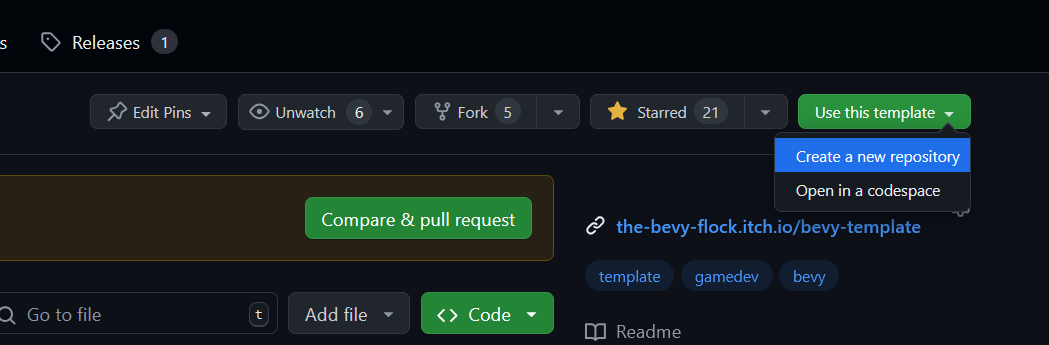
Clone your new Github repository to a local repository and push a commit with the following changes:
- Delete
LICENSE,README, anddocs/files. - Search for and replace instances of
bevy_quickstartwith the name of your project. - Adjust the
envvariables in.github/workflows/release.yaml.
Write your game
The best way to get started is to play around with what you find in src/demo/.
This template comes with a basic project structure that you may find useful:
| Path | Description |
|---|---|
src/lib.rs |
App setup |
src/asset_tracking.rs |
A high-level way to load collections of asset handles as resources |
src/audio/ |
Marker components for sound effects and music |
src/demo/ |
Example game mechanics & content (replace with your own code) |
src/dev_tools.rs |
Dev tools for dev builds (press ` aka backtick to toggle) |
src/screens/ |
Splash screen, title screen, gameplay screen, etc. |
src/theme/ |
Reusable UI widgets & theming |
Feel free to move things around however you want, though.
Tip
Be sure to check out the 3rd-party tools we recommend!
Run your game
Running your game locally is very simple:
- Use
cargo runto run a native dev build. - Use
trunk serveto run a web dev build.
If you're using VS Code, this template comes with a .vscode/tasks.json file.
Run release builds
- Use
cargo run --profile release-native --no-default-featuresto run a native release build. - Use
trunk serve --release --no-default-featuresto run a web release build.
Linux dependencies
If you are using Linux, make sure you take a look at Bevy's Linux dependencies.
Note that this template enables Wayland support, which requires additional dependencies as detailed in the link above.
Wayland is activated by using the bevy/wayland feature in the Cargo.toml.
(Optional) Improve your compile times
.cargo/config_fast_builds.toml contains documentation on how to set up your environment to improve compile times.
After you've fiddled with it, rename it to .cargo/config.toml to enable it.
Release your game
This template uses GitHub workflows to run tests and build releases. See Workflows for more information.
Known Issues
There are some known issues in Bevy that require some arcane workarounds. To keep this template simple, we have opted not to include those workarounds. You can read about them in the Known Issues document.
License
The source code in this repository is licensed under any of the following at your option:
The CC0 license explicitly does not waive patent rights, but we confirm that we hold no patent rights to anything presented in this repository.
Credits
The assets in this repository are all 3rd-party. See the credits screen for more information.