# telescope-frecency.nvim
A [telescope.nvim][] extension that offers intelligent prioritization when
selecting files from your editing history.
[telescope.nvim]: https://github.com/nvim-telescope/telescope.nvim
Using an implementation of Mozilla's [Frecency algorithm][] (used in [Firefox's
address bar][]), files edited _frecently_ are given higher precedence in the
list index.
[Frecency algorithm]: https://web.archive.org/web/20210421120120/https://developer.mozilla.org/en-US/docs/Mozilla/Tech/Places/Frecency_algorithm
[Firefox's address bar]: https://support.mozilla.org/en-US/kb/address-bar-autocomplete-firefox
As the extension learns your editing habits over time, the sorting of the list
is dynamically altered to prioritize the files you're likely to need.
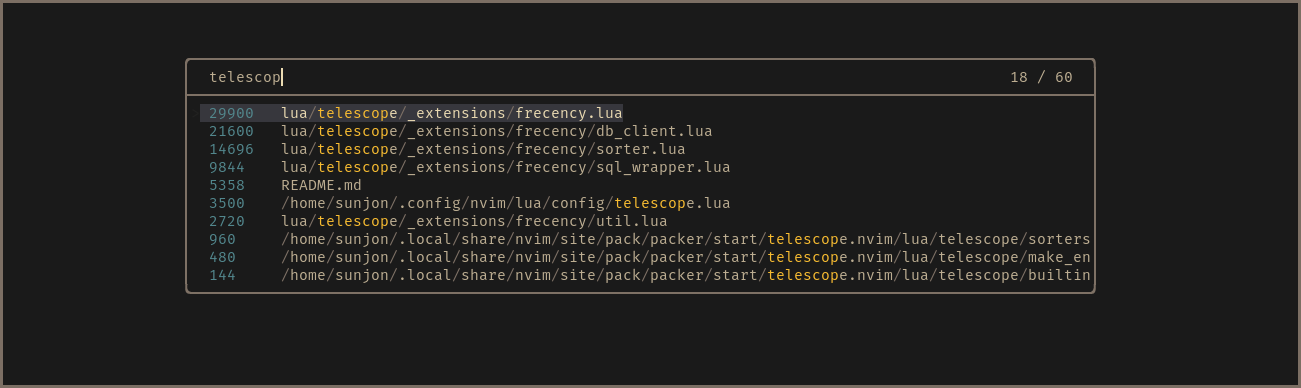 * _Scores shown in finder for demonstration purposes - disabled by default_
## What about files that are neither ‘frequent’ _or_ ‘recent’ ?
Frecency naturally works best for indexed files that have been given a
reasonably high score.
New projects or rarely used files with generic names either don't get listed at
all or can be buried under results with a higher score.
Frecency tackles this with *Workspace Filters*:
* _Scores shown in finder for demonstration purposes - disabled by default_
## What about files that are neither ‘frequent’ _or_ ‘recent’ ?
Frecency naturally works best for indexed files that have been given a
reasonably high score.
New projects or rarely used files with generic names either don't get listed at
all or can be buried under results with a higher score.
Frecency tackles this with *Workspace Filters*:
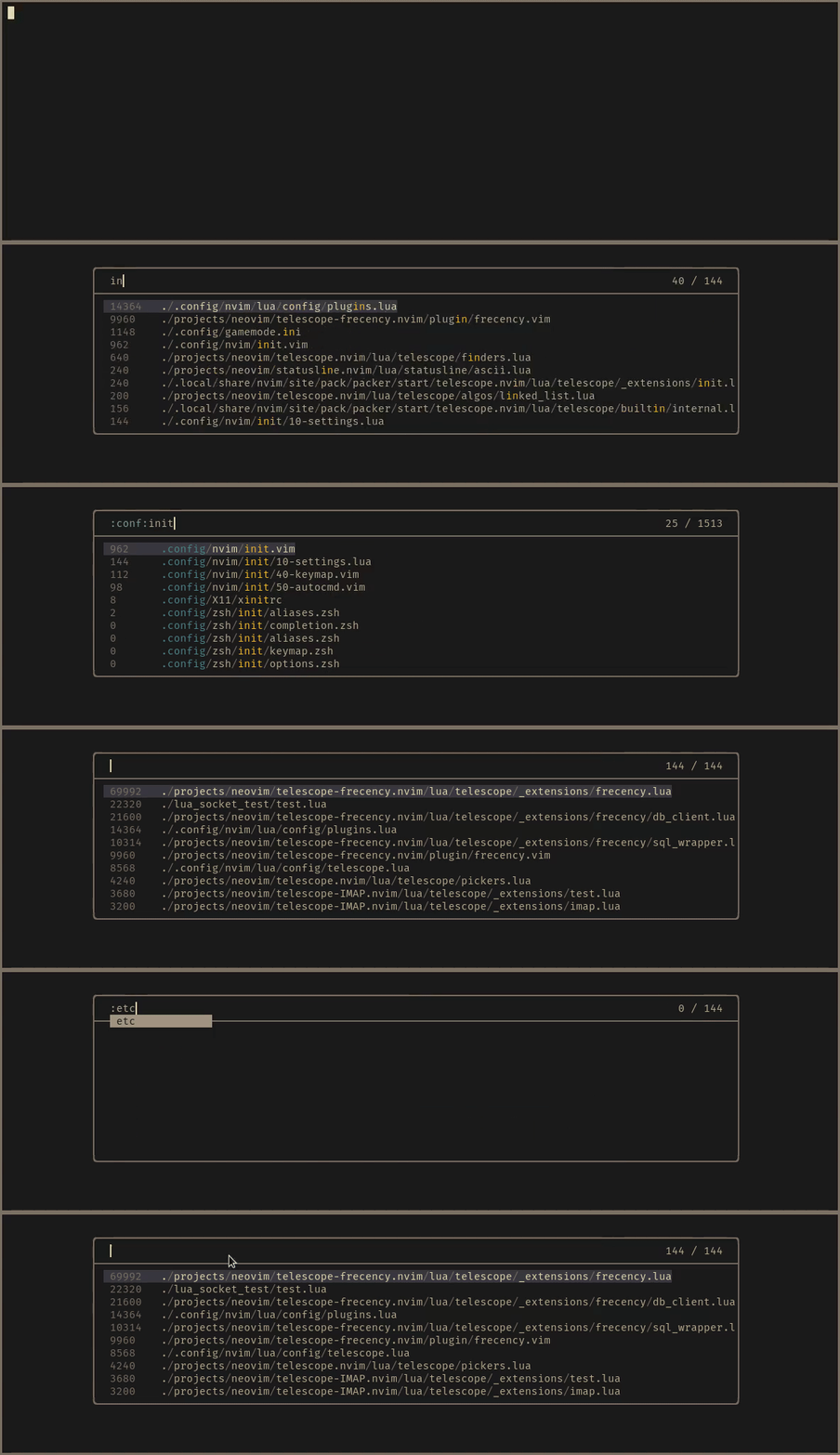 The workspace filter feature enables you to select from user defined _filter
tags_ that map to a directory or collection of directories. Filters are applied
by entering `:workspace_tag:` anywhere in the query. Filter name completion is
available by pressing `` after the first `:` character.
When a filter is applied, results are reduced to entries whose path is a
descendant of the workspace directory. The indexed results are optionally
augmented with a listing of _all_ files found in a recursive search of the
workspace directory. Non-indexed files are given a score of zero and appear
below the 'frecent' entries. When a non-indexed file is opened, it gains a
score value and is available in future 'frecent' search results.
If the active buffer (prior to the finder being launched) is attached to an LSP
server, an automatic `LSP` tag is available, which maps to the workspace
directories provided by the language server.
## Requirements
- [telescope.nvim](https://github.com/nvim-telescope/telescope.nvim) **(required)**
- [nvim-web-devicons](https://github.com/kyazdani42/nvim-web-devicons) (optional)
- [fd](https://github.com/sharkdp/fd) or [ripgrep](https://github.com/BurntSushi/ripgrep) (optional)
**NOTE:** `fd` or `ripgrep` will be used to list up workspace files. They are
extremely faster than the native Lua logic. If you don't have them, it
fallbacks to Lua code automatically.
## Installation
This is an example for [Lazy.nvim](https://github.com/folke/lazy.nvim).
```lua
{
"nvim-telescope/telescope-frecency.nvim",
config = function()
require("telescope").load_extension "frecency"
end,
}
```
See `:h telescope-frecency-configuration` to know about further configurations.
## Usage
```vim
:Telescope frecency
" Use a specific workspace tag:
:Telescope frecency workspace=CWD
" You can use with telescope's options
:Telescope frecency workspace=CWD path_display={"shorten"} theme=ivy
```
Filter tags are applied by typing the `:tag:` name (adding surrounding colons)
in the finder query. Entering `:` will trigger omni completion for
available tags.
## References
- [Mozilla: Frecency algorithm](https://developer.mozilla.org/en-US/docs/Mozilla/Tech/Places/Frecency_algorithm)
The workspace filter feature enables you to select from user defined _filter
tags_ that map to a directory or collection of directories. Filters are applied
by entering `:workspace_tag:` anywhere in the query. Filter name completion is
available by pressing `` after the first `:` character.
When a filter is applied, results are reduced to entries whose path is a
descendant of the workspace directory. The indexed results are optionally
augmented with a listing of _all_ files found in a recursive search of the
workspace directory. Non-indexed files are given a score of zero and appear
below the 'frecent' entries. When a non-indexed file is opened, it gains a
score value and is available in future 'frecent' search results.
If the active buffer (prior to the finder being launched) is attached to an LSP
server, an automatic `LSP` tag is available, which maps to the workspace
directories provided by the language server.
## Requirements
- [telescope.nvim](https://github.com/nvim-telescope/telescope.nvim) **(required)**
- [nvim-web-devicons](https://github.com/kyazdani42/nvim-web-devicons) (optional)
- [fd](https://github.com/sharkdp/fd) or [ripgrep](https://github.com/BurntSushi/ripgrep) (optional)
**NOTE:** `fd` or `ripgrep` will be used to list up workspace files. They are
extremely faster than the native Lua logic. If you don't have them, it
fallbacks to Lua code automatically.
## Installation
This is an example for [Lazy.nvim](https://github.com/folke/lazy.nvim).
```lua
{
"nvim-telescope/telescope-frecency.nvim",
config = function()
require("telescope").load_extension "frecency"
end,
}
```
See `:h telescope-frecency-configuration` to know about further configurations.
## Usage
```vim
:Telescope frecency
" Use a specific workspace tag:
:Telescope frecency workspace=CWD
" You can use with telescope's options
:Telescope frecency workspace=CWD path_display={"shorten"} theme=ivy
```
Filter tags are applied by typing the `:tag:` name (adding surrounding colons)
in the finder query. Entering `:` will trigger omni completion for
available tags.
## References
- [Mozilla: Frecency algorithm](https://developer.mozilla.org/en-US/docs/Mozilla/Tech/Places/Frecency_algorithm)