mirror of
https://github.com/kristoferssolo/solorice.git
synced 2025-10-21 20:10:34 +00:00
| .. | ||
| node_modules | ||
| out/src | ||
| types/gitignore-to-glob | ||
| .travis.yml | ||
| .vsixmanifest | ||
| appveyor.yml | ||
| CHANGELOG.md | ||
| LICENSE.txt | ||
| package-lock.json | ||
| package.json | ||
| README.md | ||
| tslint.json | ||

VSCode Advanced New File

Inspired by Sublime's AdvancedNewFile plugin, this adds the ability to create files anywhere in your workspace.
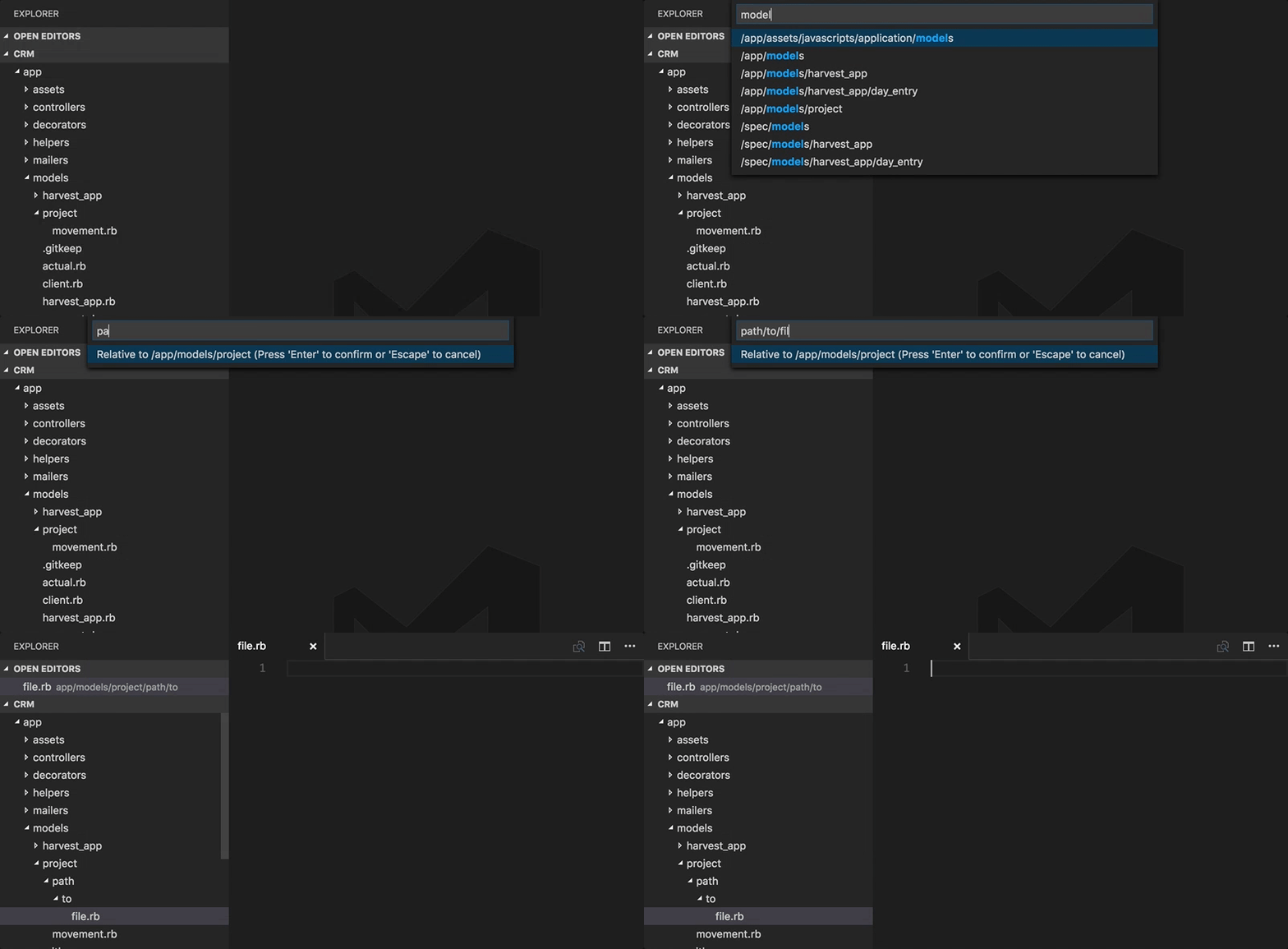
Features
- Fuzzy-matching autocomplete to create new file relative to existing path (thanks to JoeNg93 for making it faster)
- Create new directories while creating a new file
- Create a directory instead of a file by suffixing the file path with
/as insomedirectory/to create the directory (thanks to maximilianschmitt) - Ignores gitignored and workspace
files.excludesettings. - Additional option of adding
advancedNewFile.excludesettings to workspace settings just like nativefiles.exludeexcept it explicitly effects AdvancedNewFile plugin only. (thanks to Kaffiend) - Control the order of top convenient options ("last selection", "current file",
etc) via config setting
advancedNewFile.convenienceOptions
Configuration Example
"advancedNewFile.exclude": {
  "node_modules": true,
  "node_modules_electron": true,
  "dev": true,
  "dist": true
},
"advancedNewFile.showInformationMessages": true,
"advancedNewFile.convenienceOptions": ["last", "current", "root"]
Usage
- Command palette: "Advanced New File"
- Keyboard shortcut: cmd+alt+n (Mac), ctrl+alt+n (Win, Linux)
Keybindings
You can add your own keybinding in your keybindings.json
{
  "key": "ctrl+n", // "cmd+n" on mac
  "command": "extension.advancedNewFile",
}
Notes
Because VSCode extensions don't yet have the ability to do type-ahead autocomplete within the text input box (See https://github.com/Microsoft/vscode/issues/426), we work around this limitation and provide autocomplete using a two-step workflow of selecting existing path, then providing new filename/path relative to the selection.
Contributing
- Clone the repo
$ npm install- Add your feature or fix (in
src/) with test coverage (intest/) - Launch the extension and do some manual QA (via Debug > Launch Extension)
- Run the tests (via Debug > Launch Tests)
- Run the linter:
npm run lint - Open a PR