| .. | ||
| icons | ||
| locale | ||
| both.png | ||
| example1.png | ||
| example2.png | ||
| example_response.json | ||
| negative.png | ||
| README.md | ||
| weather-widget.png | ||
| weather.lua | ||


Weather widget


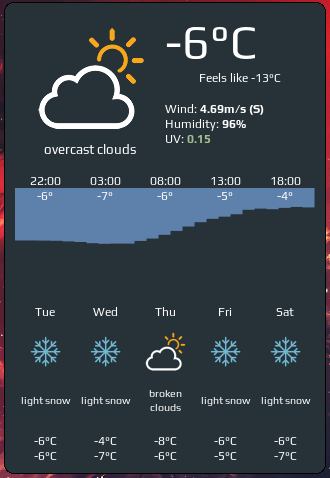
The widget showing current, hourly and daily weather forecast:

The widget consists of three sections:
- current weather, including humidity, wind speed, UV index
- hourly forecast for the next 24 hours
- daily forecast for the next five days
Customization
It is possible to customize widget by providing a table with all or some of the following config parameters:
| Name | Default | Description |
|---|---|---|
| coordinates | Required | Table with two elements: latitude and longitude, e.g. {46.204400, 6.143200} |
| api_key | Required | Get it here |
| font_name | beautiful.font:gsub("%s%d+$", "") |
Name of the font to use e.g. 'Play' |
| both_units_widget | false | Show temperature in both units - '28°C (83°F) |
| units | metric | metric for celsius, imperial for fahrenheit |
| show_hourly_forecast | false | Show hourly forecase section |
| time_format_12h | false | 12 or 24 hour format (13:00 - default or 1pm) |
| show_daily_forecast | false | Show daily forecast section |
| icon_pack_name | weather-underground-icons | Name of the icon pack, could be weather-underground-icon or VitalyGorbachev or create your own, more details below |
| icons_extension | .png |
File extension of icons in the pack |
| timeout | 120 | How often in seconds the widget refreshes |
Icons:
The widget comes with two predefined icon packs:
To add your custom icons, create a folder with the pack name under /icons and use the folder name in widget's config. There should be 18 icons, preferably 128x128 minimum. Icons should also respect the naming convention, please check widget's source.
Examples:
Custom font, icons

weather_curl_widget({
    api_key='<your-key>',
    coordinates = {45.5017, -73.5673},
    time_format_12h = true,
    units = 'imperial',
    both_units_widget = true,
    font_name = 'Carter One',
    icons = 'VitalyGorbachev',
    icons_extension = '.svg',
    show_hourly_forecast = true,
    show_daily_forecast = true,
}),
Only current weather
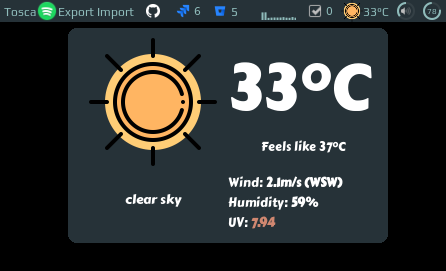
weather_curl_widget({
    api_key='<your-key>',
    coordinates = {45.5017, -73.5673},
}),
Installation
-
Download json parser for lua from github.com/rxi/json.lua and place it under ~/.config/awesome/ (don't forget to star a repo ):
wget -P ~/.config/awesome/ https://raw.githubusercontent.com/rxi/json.lua/master/json.lua -
Clone this repo under ~/.config/awesome/:
git clone https://github.com/streetturtle/awesome-wm-widgets.git ~/.config/awesome/ -
Get Open Weather Map app id here: openweathermap.org/appid.
-
Require weather widget at the beginning of rc.lua:
local weather_widget = require("awesome-wm-widgets.weather-widget.weather") -
Add widget to the tasklist:
s.mytasklist, -- Middle widget
    { -- Right widgets
        layout = wibox.layout.fixed.horizontal,
        ...
        --default
        weather_widget({
            api_key='<your-key>',
            coordinates = {45.5017, -73.5673},
        }),
        ,
        --customized
        weather_curl_widget({
            api_key='<your-key>',
            coordinates = {45.5017, -73.5673},
            time_format_12h = true,
            units = 'imperial',
            both_units_widget = true,
            font_name = 'Carter One',
            icons = 'VitalyGorbachev',
            icons_extension = '.svg',
            show_hourly_forecast = true,
            show_daily_forecast = true,
        }),
        ...
More screenshots
Only negative temperature:
Both positive and negative tempertature:

How it works
TBW